Apparel
Artificial Intelligence
Automotive
Beauty
Blockchain & Web3
Business
Education
Electronics
Entertainment
Food & Restaurants
Health
Hobbies & Toys
Home & Garden
Money
Pets
Shopping
Software
Sports & Outdoors
What is a RAW File?
EducationWhat is a RAW File?
Many professional photographers take pictures and record these in RAW files. Also, photography tutorials advice photographers to take pictures as RAW files to be able to explore a wide range of options to develop the pictures.
Why take pictures in RAW file form and why take the time to develop those pictures?
As the term connotes, RAW pictures are those pictures recorded by the camera without any processing. It's much like the negatives photographers once use before they have it developed in the photo laboratory or before developing the film themselves.
Developing pictures from exposed film gives the developer some leeway to make some tweaks on the resulting picture. He can saturate the colors, make the outlines sharper, make the picture light, overexpose it, darken it, among others.
The same thing could be done with RAW files taken by the digital camera. A software is used to make adjustments from an original RAW file.
For example, a RAW file taken using a Panasonic Lumix DMC G10 mirrorless camera is shown below:
.jpg)
Using the Silkypix Developer Studio 3.1, a RAW file processing software, the above picture was saturated by 1.5 steps. The resulting picture is shown below.
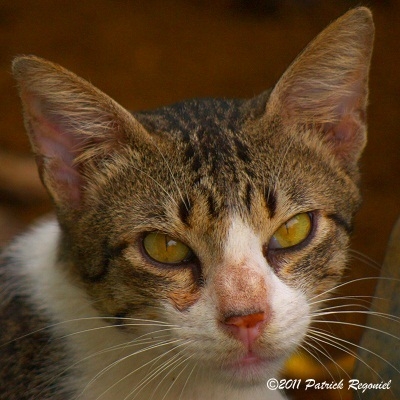
Notice that the same picture became much more colorful and radiant. The drabness of the RAW file was made more dramatic by the increased saturation of colors. The color of the eyes was enhanced and the pink nose showed more life to the cat.
The picture looks a bit harsh so I decided to set the picture to its lowest contrast setting. Here's the result:
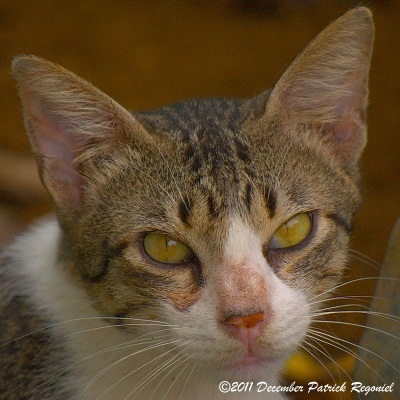
Now, the picture look much softer and matches the loving nature of the cat.
Notice that the mood of the picture changes as tweaks are made on it. This makes the RAW file a good file to work with and create the effect or preference you want out of your pictures. The photographer is given more flexibility in demonstrating his creativity and exploring different outcomes.
Once the photographer is satisfied with the pictures after making some adjustments, the picture can be saved into the conventional JPEG or TIFF file as the software will allow. These are comparatively smaller files.
So the next time you decide to take pictures, consider setting your camera in RAW mode. But of course, you need a camera that has this feature as well as more than enough capacity memory card to hold the large RAW files. The RAW file in the picture shown above occupies 13.9 megabytes of space.
©2011 December 4 Patrick Regoniel What is a RAW file?